
I build tools that streamline day-to-day business operations. My background is in operations management at the frontlines of social services work in NYC.
This portfolio documents my work in architecting internal tools, automating critical workflows, and deploying low-code systems that allow organizations to run smoothly.
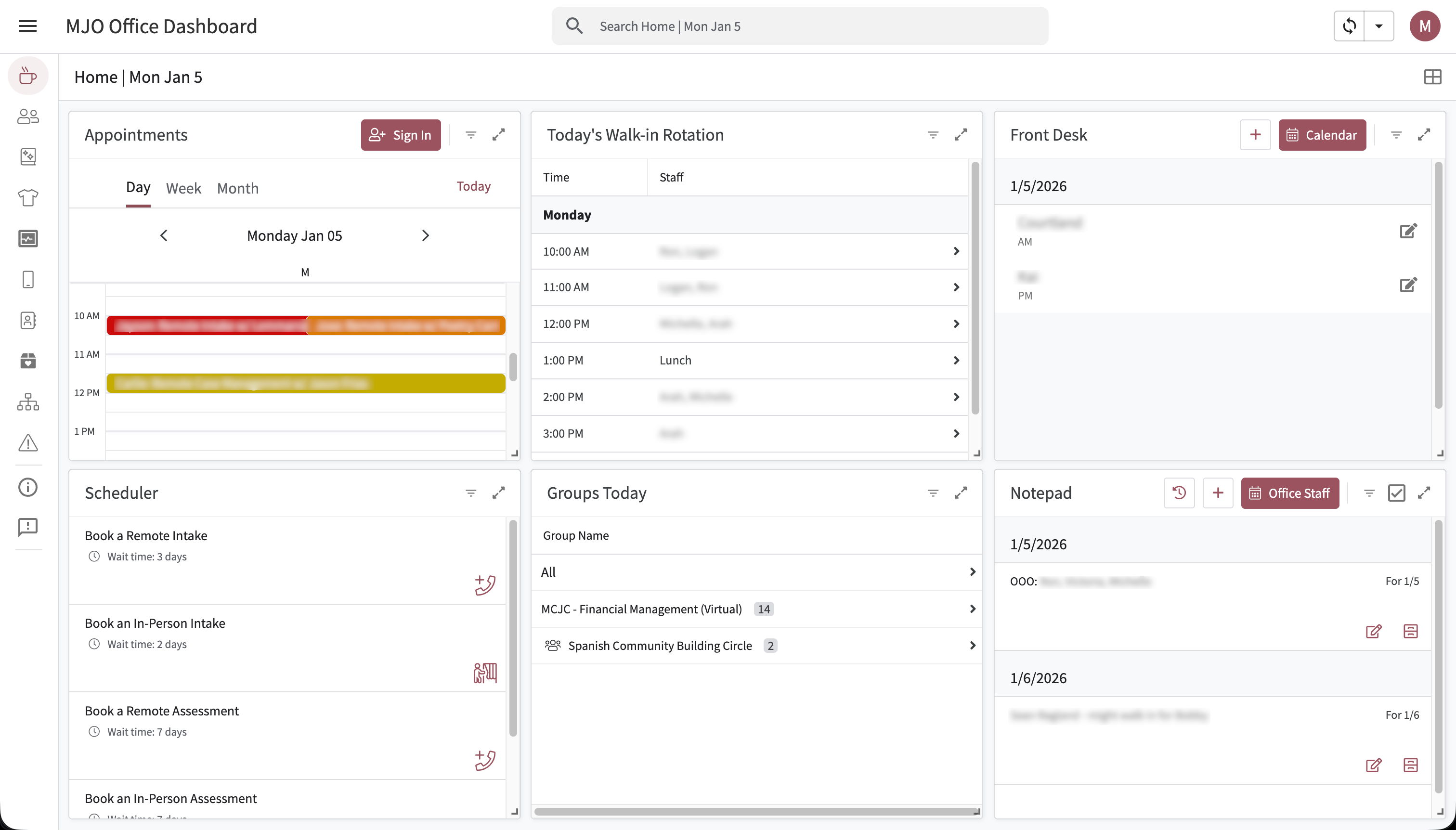
The MJO Dashboard: A Full-Stack Operations Platform
System Ecosystem
Deep Dives: Operational Impact
Front Desk Single-Pane-of-Glass
The Problem: A new office layout broke sightlines between reception and staff. Reliance on paper sign-ins created safety blindspots and slowed down critical communication about high-needs clients.
The Build: An AppSheet dashboard acting as a "Mission Control" for reception.
- Real-Time Logic: Pulls Acuity API data to show today's appointments, wait times, and group rosters in one view.
- Safety Alerts: A "Special Instructions" virtual column flags banned or high-needs clients instantly upon name entry.
- Slack Integration: Signing a client in triggers a webhook that posts to the office channel and auto-tags the assigned social worker in a thread.
Compliance Reporting Stack
The Problem: Court reporting was a manual nightmare. Finding cases, looking up dockets, and drafting emails took ~3 minutes per case. With 30+ cases a day, this cost the team 5-6 hours weekly.
The Build: A "Human-in-the-Loop" automation suite using Google Apps Script.
- Drive Database: Script auto-generates a nested folder structure (Year > Month > Week > Day) for organized filing.
- Template Engine: Pulls case metadata to pre-fill headers in Google Doc templates, leaving the narrative body for human validation.
- Email Drafts: Auto-drafts emails to court parts based on a user-to-court mapping system.
Phone Distribution System
The Problem: Social workers requested phones via ad-hoc Slack DMs. The sole Office Manager was overwhelmed tracking requests across multiple channels, leading to cognitive overload and lost tickets.
The Build: A centralized ticketing system with automated state management.
- Workflow Automation: "New Request" triggers a DM to the Office Manager. "Acknowledge" notifies the Social Worker.
- State Machine: Tracks status from Pending → Prep → Ready/Shipped → Completed.
- Audit Trail: Created a reliable "Source of Truth" for leadership to audit hardware expenses.
Consulting Work
Kinship Barbershop: Real-Time Payroll ETL
System Architecture
Key Engineering Challenges
- Missing Staff Attribution: Square's API often drops staff IDs on Quick Charge transactions. Built a heuristic fallback engine
findStaffByCustomerAppointment_that correlates timestamps with booking history to recover lost attribution. - Complex Commission Logic: Implemented a tiered logic engine that handles different commission rates for Services vs. Products, splits processing fees 50/50, and isolates tax liabilities based on owner/contractor status.
- Incremental Sync: Implemented cursor-based pagination (
SYNC_CURSOR_KEY) to fetch only modified transactions, respecting API rate limits.
Code Snippet
// From syncSquareToSheet()
// Logic: Batch processing with Idempotency & Staff Recovery

function syncSquareToSheet() {
  const props = PropertiesService.getScriptProperties();
  const nowIso = new Date().toISOString();
  // Resume from last sync cursor
  const beginIso = props.getProperty(SYNC_CURSOR_KEY) || isoDaysAgo_(30);

  const payments = fetchPaymentsUpdatedSince_(beginIso, nowIso);

  // Batch Fetch related Orders to minimize API calls (N+1 problem)
  const orderIds = unique_(payments.map(p => p.order_id));
  const ordersById = batchRetrieveOrders_(orderIds);

  // Heuristic: Pre-fetch booking info to resolve missing staff
  const bookingInfo = prefetchBookingInfo_(ordersById);

  payments.forEach(p => {
    // Transform raw API data into payroll row
    const row = buildProcessedRow_(
        p, ordersById[p.order_id], catalogInfo, staffById,
        customersById, commissionData, bookingInfo
    );
    // Upsert logic (Update if exists, Append if new)
    if (paymentRowIndex[p.id]) {
      updates.push({row: paymentRowIndex[p.id], values: row});
    } else {
      appends.push(row);
    }
  });

  props.setProperty(SYNC_CURSOR_KEY, nowIso);
}New Tomorrow Partners: Resource Forecasting Middleware
System Architecture
Key Engineering Challenges
- API Rate Limiting & Idempotency: Airtable API has strict rate limits. I implemented a
syncIdempotentfunction that first fetches all existing record IDs, creates a hash map, and creates separate `toInsert` and `toUpdate` batches to minimize API calls. - Data Normalization: Harvest stores data in nested JSON objects. The middleware flattens this into a relational structure suitable for Airtable, calculating "Burn Rate" and "Projected Finish" dates on the fly.
Code Snippet
// From syncIdempotent()
// Logic: Batching requests to respect API limits & prevent duplicates

function syncIdempotent(sheetName, tableId, uniqueFieldName) {
  // 1. Fetch all existing Airtable records to build a Lookup Map
  const existingRecords = fetchAllAirtableRecords(tableId);
  const recordMap = new Map();
  existingRecords.forEach(r => recordMap.set(r.fields[uniqueFieldName], r.id));

  // 2. Diff Local Data vs Remote Data
  const {hdr, data} = read(sheetName);
  const toInsert = [];
  const toUpdate = [];

  data.forEach((row) => {
    const uniqueVal = row[uniqueColIndex];
    const fields = mapRowToFields(row);

    if (recordMap.has(uniqueVal)) {
      toUpdate.push({ id: recordMap.get(uniqueVal), fields: fields });
    } else {
      toInsert.push({ fields: fields });
    }
  });

  // 3. Execute Batched API Calls (Max 10 per request)
  while (toInsert.length > 0) {
    const batch = toInsert.splice(0, 10);
    airtablePOST(tableId, { records: batch });
    Utilities.sleep(250); // Rate limit backoff
  }
}Public Loss Adjusters: Direct Mail Drip Campaigns
System Architecture
Key Engineering Challenges
- State Management without a Database: Used Google Sheets as a state machine. The script calculates
nextTriggerDatebased on the current stage and runs an hourly cron job (`weeklyTrigger`) to check for rows that have matured. - Visual Feedback: Implemented a dynamic progress bar function (
generateProgressBar) that updates cell values with emojis (🟩⬜) to give non-technical staff instant visual status of a lead's position in the drip campaign.
Code Snippet
// From processLead()
// Logic: State machine for drip campaign execution

function processLead(rowIndex, weekStage) {
  // 1. Validate Data Integrity
  if (!hasRequiredFields(row) || row[IS_PAUSED_INDEX]) return;

  // 2. Construct Payload for Direct Mail API
  const payload = buildPayload(row);
  const webhookUrl = props.getProperty(weekStage + '_WEBHOOK');

  // 3. Execute External Action
  const response = sendToPostalytics(webhookUrl, payload, authHeader);

  if (response.getResponseCode() === 200) {
    // 4. Update State Machine
    const nextWeek = new Date(now.getTime() + (7 * 24 * 60 * 60 * 1000));
    const stageNum = parseInt(weekStage.replace('WEEK_', ''));

    // Update Stage, Progress Bar, and Next Trigger Date
    sheet.getRange(rowIndex, 2).setValue('Week ' + stageNum);
    sheet.getRange(rowIndex, 3).setValue(generateProgressBar(stageNum));
    sheet.getRange(rowIndex, 5).setValue(nextWeek);
  }
}Busy Bees Maid Service: Hiring Automation CRM
System Architecture
Key Engineering Challenges
- "Quiet Hours" Logic: The system queues SMS messages. If a manager updates a status at 11 PM, the script detects this and schedules the Twilio API call for 8 AM the next morning to avoid disturbing candidates.
- Dynamic Templating: Built a mapping system where the script pulls email/SMS body text from specific Google Docs (`Template Mappings` sheet), allowing the non-technical owner to rewrite copy without touching the code.
Code Snippet
// Logic: Watch for Status Change -> Execute Action

function onEdit(e) {
  const range = e.range;
  const sheet = range.getSheet();

  // Only trigger on 'Pipeline Progress' column changes
  if (sheet.getName() === 'Application' && range.getColumn() === PIPELINE_COL) {
    const status = e.value;
    const row = range.getRow();
    const candidate = getCandidateData(row);

    if (status === 'Invite to Interview') {
       // Check Quiet Hours before sending SMS
       if (isQuietHours()) {
         scheduleMessageForMorning(candidate);
       } else {
         sendTwilioSMS(candidate.phone, getTemplate('INVITE_SMS'));
       }
    }
  }
}